Control Blender via Webcam
I’ve built a webcam-controlled armature in Blender that runs in real time at 30 Hz.
This demo shows it in action:
Here’s how you can use it yourself
This Gesture Recognizer Widget was built in Jupyter, on top of Google’s MediaPipe Gesture Recognizer.
It runs offline, the package is open source and free to use commercially.
To run this yourself, you need two things:
- Jupyter running inside Blender,
- the gesture-recognizer-widget package (the notebook installs this for you).
Step by step
First, here’s a video on how to set this up, then the same in text form.
1. Install the Jupyter extension
Drag the button below onto a running Blender window — drop it twice: first to add the repository, then to install the add-on.

Jupyter notebooks running inside Blender's Python interpreter
If you want to learn more about Jupyter in Blender, watch this YouTube video.
2. Run the notebook
Download the notebook and open it inside Blender’s Jupyter:
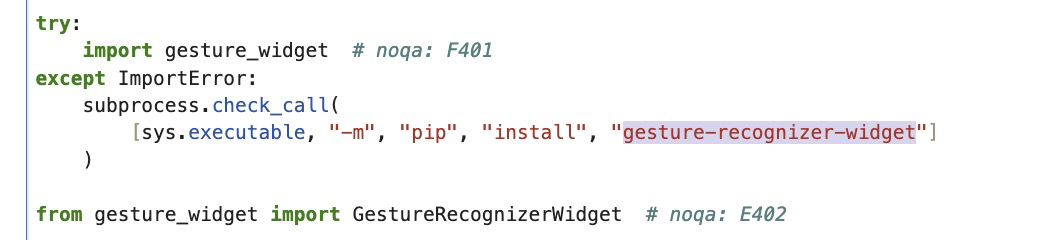
Note: the notebook is self contained — its first cell automatically installs gesture-recognizer-widget if it isn’t already present:
And that’s it, enjoy playing around with this bridge.
How it works
The browser does the seeing, Python does the reacting.
In the browser, MediaPipe reads each webcam frame and finds your hand — up to 21 points per hand, plus a gesture label like Open_Palm or Victory. Those points are sent over to Python a few times a second.
On the Python side, each tracked point is just a value you can watch. So you can write:
w.observe(lambda ch: print(ch["new"]), "index_finger_tip")and Python prints the fingertip position every time it moves — no polling loop needed.
To drive Blender, the demo notebook builds a small hand-shaped armature and, on a timer, points each bone at the matching tracked point. A bit of smoothing keeps the motion from jittering.
# snippet from the notebook
w.observe(lambda ch: print(ch["new"]), "index_finger_tip")

# control:
w.start()
w.mirror = False
w.max_num_hands = 1
w.sync_interval_ms = 33  # ~30 Hz
Tracked points and gestures
All 21 hand points from the MediaPipe model are exposed as observable values (traitlets):
wrist, thumb_cmc, thumb_mcp, thumb_ip, thumb_tip,
index_finger_mcp/pip/dip/tip, middle_finger_*, ring_finger_*, pinky_*
Each is a list [x, y, z] normalised to 0–1 in image space (empty list when no hand is visible). Recognised gestures: Open_Palm, Closed_Fist, Pointing_Up, Thumb_Up, Thumb_Down, Victory, ILoveYou.
Source
The project is on GitHub and published as gesture-recognizer-widget on PyPI.